iTerm2 - how to save the current settings, including arrangements
How to save ALL your iTerm settings
I had this set up once and then, of course, promptly forgot how I had done it. So, now that I've needed it again, I'll document how I got things working and how to do it again, if needed.
First, you need to
- go to Preferences in iTerm2
- this assumes iTerm2, v3.3, build 3.3.12, for reference
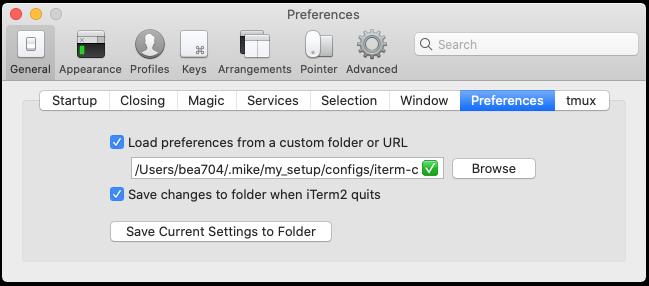
- iTerm2 | Preferences | General | Preferences tab.
- Once there, look at the reference screenshot below.
- select Load preferences from a custom folder or URL
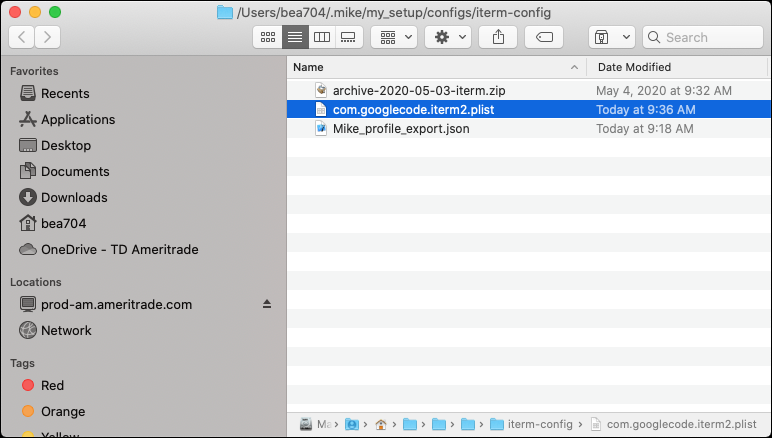
- I currently have this as my folder: /Users/bea704/.mike/my_setup/configs/iterm-config -- note, that for a different machine, you'll probably need to change the user porition - I have not tried using a directory like this:
~/.mike/my_setup/configs/iterm-configto see if it would work or not, but I think it probably would work, but ... - select Save changes to folder when iTerm2 quits
- make sure that you have the latest version of the com.googlecode.iterm2.plist in that directory, so that the next time it loads up, it will grab them.
That's pretty much it for the setup.
One caveat is that if you're just starting to set this up, then it's a little tricky. You will have to do these additional steps:
- follow the steps above, except you might not have a com.googlecode.iterm2.plist to copy (that's why you're doing this)
- the first time you do this, you might need to then (after the step where you don't have the plist to copy to the directory) hit the Save Current Settings to Folder button to save a copy of your settings and set things up.
- note - since you have the save changes option set, if you copy over the new plist to the directory before exitting, it will be overwritten with your current settings. So, be aware.
Here are a couple of screen shots that might help:
The configuration dialog/popup:
And, the directory where they live:
Anyway, that, I think is the process.